Linux命令
Linux很有效的命令
1. man
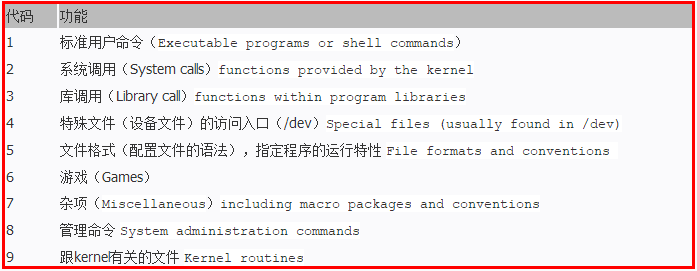
Linux提供了丰富的帮助手册,当你需要查看某个命令的参数时不必到处上网查找,只要man一下即可。同时也可以使用man man 查看man的使用方法。
原文链接:http://www.linuxidc.com/Linux/2017-03/142407.htm
2. dpkg
查看某个安装包的具体安装位置,可以首先使用
dpkg -l | grep package_name
例如
dpkg -l | grep tensorrt
nvidia@jetson:/usr/src$ dpkg -l | grep tensorrt
ii  nvidia-container-csv-tensorrt                7.1.3.0-1+cuda10.2                               arm64        Jetpack TensorRT CSV file
ii  tensorrt                                     7.1.3.0-1+cuda10.2                               arm64        Meta package of TensorRT
然后使用
dpkg -L tensorrt
结果:
nvidia@jetson:/usr/src$ dpkg -L tensorrt
/.
/usr
/usr/share
/usr/share/doc
/usr/share/doc/tensorrt
/usr/share/doc/tensorrt/changelog.Debian
/usr/share/doc/tensorrt/copyright
查看某个文件夹是哪个软件安装的
sudo dpkg -S path
or
sudo dpkg-query -S path
举个例子
sudo dpkg -S /usr/src/tensorrt
结果
nvidia@jetson:/usr/src$ sudo dpkg -S /usr/src/tensorrt
[sudo] password for nvidia:
libnvinfer-samples, libnvinfer-bin: /usr/src/tensorrt
or
nvidia@jetson:/usr/src$ sudo dpkg-query -S /usr/src/tensorrt
libnvinfer-samples, libnvinfer-bin: /usr/src/tensorrt
debian及其衍生版
先安装apt-file
sudo apt-get install -y apt-file
apt-file update
查询命令:(已查询ifconfig为例)
root@debian ~ # apt-file search bin/ifconfig
net-tools: /bin/ifconfig
apt-file search -x(–regexp) 后可接正则表达式,如:
apt-file search -x ‘bin/rzKaTeX parse error: Expected 'EOF', got '#' at position 36: … root@deepin ~ #̲ apt-file searc…’